
Construction Project Budget Template: Plan a Muskoka Build with Confidence
What if the costs most likely to disrupt your Muskoka project aren’t the ones you first think to include? Materials and labour matter, but site access, shoreline conditions, preparation work and timing can also shape the plan.
A construction project budget template gives you a practical way to organize those details. It won’t remove every uncertainty, but it can show what’s included, what’s still an estimate and where a change may affect the budget. If you’re planning a cottage renovation, deck, dock or boathouse, a clear structure makes it easier to weigh priorities and plan the work.
In this guide, you’ll learn what to include in your budget, how to record assumptions, estimates, commitments and actual spending, and how to keep the plan current as work progresses. You’ll also see how to account for Muskoka site conditions, so you can have a more informed conversation about scope, timing and costs from the outset.
Key Takeaways
- Use a construction project budget template to keep estimates, approved amounts and actual costs organized in one place.
- Separate budget categories so costs beyond materials and labour are easier to account for.
- Adapt your plan to Muskoka’s waterfront access, site conditions and seasonal timing.
- Record assumptions and update the budget as scope, decisions and costs change.
- Bring your scope, site notes and estimates to a project discussion to make planning clearer.
What a construction project budget template should do for a Muskoka build
A construction project budget is a working plan, not just a total at the bottom of a page. It brings together estimated costs, amounts committed to approved work or purchases, and actual costs as they’re recorded. A useful construction project budget template also shows what each figure relates to, the assumptions behind it and which decisions are still outstanding.
A budget serves a different purpose from related project documents. A quote describes proposed work and pricing; an invoice records an amount being billed. A cash-flow plan focuses on when money is expected to go out, while the final project cost reflects actual spending once work is complete. Keeping these records separate helps you track both the overall plan and progress.
Your budget should reflect the project’s scope, location, timing and priorities. For example, a Muskoka waterfront project may need planning around access to the work area, shoreline conditions and existing structures. These details can affect the work required, and each property is different. Cardwell’s construction services in Muskoka include planning and building docks, boathouses, decks and renovations, with project-based quotes that account for materials, labour and project management.
Who benefits from a construction budget template?
Owners planning new construction, repairs, a deck, dock, boathouse or renovation can use a shared budget to make the intended work easier to discuss. It gives the owner and project team one place to compare priorities, estimates and decisions, instead of relying on memory or scattered notes. Treat early figures as planning tools, not guaranteed final totals, and refine them as the scope and site become clearer.
Start with scope, assumptions, and exclusions
Begin by describing the work area and intended result, then note the materials under consideration and any known site conditions. Record assumptions about access, existing structures, utilities and timing. For a dock project, for instance, note the expected access route and what’s already at the shoreline. These details help define the planning context, but they don’t mean every waterfront project will follow the same approach.
Make a separate note of exclusions and unresolved decisions. If a material choice, access detail or part of the scope is undecided, label it clearly instead of leaving it out. This gives you a more dependable starting point for reviewing estimates and discussing what the project includes.
Construction project budget template: the line items to include
A useful construction project budget template separates the cost of doing the work from planning and project-related fees. Keep estimates distinct from approved amounts and actual spending, and label items that are still uncertain. This makes it easier to see what’s included and what needs a decision, rather than burying an unknown inside a broad category.
Build the template around clear cost categories
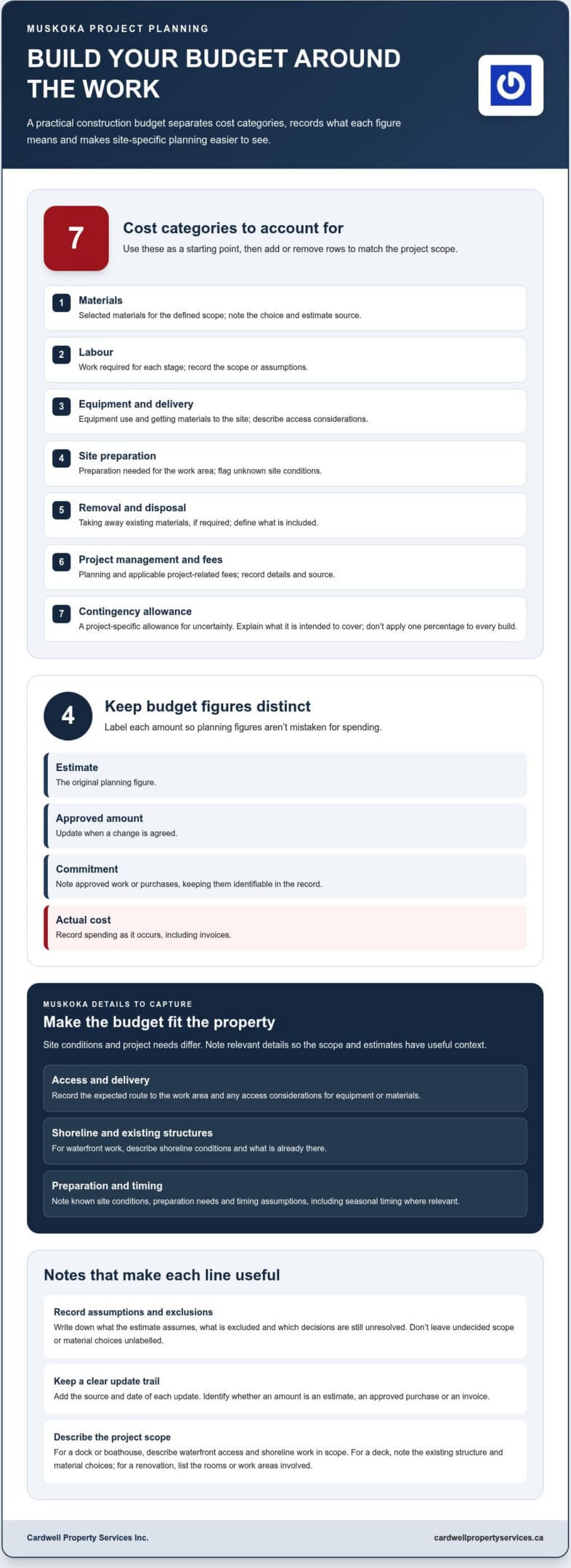
Start with the main cost groups below, then add or remove rows to match the project. Direct work costs cover the materials, labour and equipment needed to build. Separate rows for access, site preparation, removal and disposal help you account for Muskoka site needs where they apply. Keep project management and applicable fees separate from direct costs. For category inspiration, see the Grants.gov Budget Detail, then adapt the structure to your project and Canadian context.
| Category | Description | Estimate | Approved amount | Actual amount | Notes |
|---|---|---|---|---|---|
| Materials | Selected materials for the defined scope | Record choice and estimate source/date | |||
| Labour | Work required for each stage | Note scope or assumptions | |||
| Equipment and delivery | Equipment use and getting materials to the site | Describe access considerations | |||
| Site preparation | Preparation needed for the work area | Mark unknown site conditions | |||
| Removal and disposal | Taking away existing materials, if required | Define what is included | |||
| Project management and fees | Planning and applicable project-related fees | Record details and source | |||
| Contingency allowance | Project-specific allowance for uncertainty | Explain what it is intended to cover |
For a dock or boathouse, describe waterfront access and shoreline work that falls within the project scope. For a deck, note the existing structure and material choices; for a renovation, list the rooms or work areas involved. Don’t apply one contingency percentage to every build. Set an allowance that reflects the project’s known uncertainties, and explain its purpose in the notes.
Add columns that make the budget useful
Use the estimate column for the original figure, then update approved amounts when changes are agreed. Track commitments, invoices and spending in the notes, along with the source and date of each update. For example, note whether an amount is an estimate, an approved purchase or an invoice, so the figures aren’t confused. This creates a simple record of how the plan changes over time. If you’re preparing a budget for a Muskoka build, Muskoka construction services can help frame a clear conversation about scope, materials and project planning.
How to adapt and update your construction budget in Muskoka
A budget is most useful when it changes alongside the project. Use the same routine each time you review your construction project budget template, so estimates, approvals and actual spending stay connected.
- Confirm the scope. Write down the work included and any decisions that could change it.
- Gather estimates. Record each estimate’s source and date, and note which work or materials it covers.
- Record assumptions. Capture what’s known about site access, existing structures, shoreline conditions and timing. Mark unanswered questions clearly.
- Review the plan. Compare estimates with approved commitments, invoices and actual spending. Note differences and what may explain them.
- Update the budget. Revise working figures after documenting a change and its approval status. Update the schedule too if the change affects the planned work.
Plan for the property, not just the drawing
On a Muskoka waterfront property, the distance from access points to the work area, shoreline conditions and the condition of existing structures can all shape planning. A drawing may show what’s intended, but it may not answer every question about reaching the site or working around what’s already there. Record known constraints and questions as assumptions that need follow-up. Don’t assign a cost or schedule impact until you have project information to support it.
Timing belongs in the notes, too. Record the intended project period and any seasonal considerations that may affect planning, without assuming every dock, boathouse, deck or renovation follows the same schedule. Check applicable permit and approval requirements with the relevant local authority, and note related decisions or fees once they’re understood.
Track changes before they become surprises
When the scope shifts, log the requested change, why it’s needed, its budget effect and whether it’s approved. Keep the original estimate visible, then record updated estimates, commitments, invoices and actual amounts separately. This makes it easier to see what changed and why, rather than treating a revised total as if it were the original plan. For another perspective on construction budget structure, Smartsheet Construction Budget Templates offers examples of budget categories and tracking fields.
For related planning context, read this guide to waterfront project management in Muskoka. A clear record gives you and your construction team a steadier basis for discussing the next decision.
Use your budget template to plan the next construction step
A completed draft helps turn a broad idea into a more useful project conversation. It can show what matters most to you, what’s already known about the property and where more information is needed. Keep it flexible: as the design, material choices or understanding of the site develops, revise the construction project budget template rather than treating early estimates as fixed commitments.
Prepare for a useful project conversation
Bring a short summary of the work you’re considering, how you intend to use the space and the priorities guiding your decisions. For a cottage renovation, that might mean identifying the rooms involved and the outcome you’re hoping for. For a waterfront project, note the work area and any relevant access or shoreline observations.
It also helps to separate confirmed decisions from options still under consideration. Gather the scope, site notes, estimates, known constraints and open questions in one place. This gives everyone a clearer starting point without suggesting preliminary figures are final.
- Confirmed: the work you want included and decisions already made.
- Under consideration: material or design options you haven’t settled on.
- Needs follow-up: site questions, information gaps and items that may affect planning.
Match planning support to the project type
The details to discuss depend on the work. If you’re planning a waterfront structure, explore custom boathouse construction and how the proposed scope fits your property. For a project centred on shoreline access, learn more about custom dock construction. In either case, a clear record of priorities, assumptions and decisions helps keep planning grounded in the specific site.
Cardwell Property Services Inc. works on Muskoka construction and renovation projects, including docks, boathouses, decks and home renovations. If you’re ready to discuss your project, bring your draft budget and notes to the conversation. They’re a practical foundation for shaping the next step together.
Take the next step with a clearer plan
A practical construction project budget template gives you more than a running total. It connects the work you want done with site conditions, estimates, approved changes and actual spending. Keep assumptions and open questions visible, then update the plan as choices and project details become clearer.
Bring your scope, priorities, property notes and current estimates to a project discussion. Cardwell Property Services Inc. provides project-based construction and renovation quotes for Muskoka projects, including docks, boathouses, decks, home renovations and general construction. The team also helps clients work through material selection and local building codes, keeping planning grounded in the needs of the property.
With a considered budget and a clear conversation, you can approach the work with greater confidence and care for your Muskoka property. Discuss your Muskoka construction project with Cardwell and begin shaping a plan that fits your goals.
Frequently Asked Questions
What should a construction project budget template include?
A construction project budget template should show each cost category, what it covers, and its estimated, approved and actual amounts. Include materials, labour, equipment, delivery, site preparation, project management and applicable fees, with notes for estimate sources, dates and assumptions. Add rows for removal, disposal or access when they’re part of the scope. A separate, project-specific contingency allowance can make uncertainty visible without treating it as a confirmed expense.
How do I make a construction budget for a Muskoka property?
Start by defining the work, intended result and priorities, then record what’s known about the property, including access, shoreline conditions and existing structures. Gather estimates and note their sources, dates and assumptions. Whether your property is in Gravenhurst, Bracebridge, Parry Sound, Huntsville, Dorset, Collingwood, Midland, Orillia, Haliburton, Port Carling, Mactier or Barrie, check applicable permit and approval requirements with the relevant local authority. Keep unanswered site questions visible as the plan develops.
How much contingency should I include in a construction budget?
There isn’t one contingency percentage that suits every project. Set an allowance based on the project’s scope and known uncertainties, such as unanswered questions about access or existing site conditions. Record what the allowance is meant to cover and keep it separate from approved costs and actual spending. As more information becomes available, review whether the allowance still fits the project rather than treating it as extra money automatically available for other work.
What is the difference between a construction estimate and a project budget?
A construction estimate is a cost projection for a defined piece of work, based on the information available at that time. A project budget is the broader working plan: it organizes estimates by category and tracks approved amounts, commitments, invoices, actual spending and changes. The estimate can inform a budget, but the budget also helps you see how decisions and updates affect the project as a whole.
How do I track changes in a construction project budget?
Log each requested change before revising the working budget. Record what’s changing, why, the estimated budget effect and whether it’s approved. Keep the original estimate visible, then update the approved amount, commitments, invoices and actual spending as information comes in. Review these figures regularly and note any effect on the schedule. This record helps distinguish an early assumption from an agreed change and makes project discussions clearer.
Can I use the same budget template for a dock, boathouse, and renovation?
Yes. Use the same basic columns, but tailor the cost categories and notes to each project’s scope. A dock budget may need specific rows for shoreline access and site preparation; a boathouse or home renovation will have different work areas, materials and decisions to track. Keep the shared structure for comparing estimates and actual spending, and add or remove line items so the template reflects the property and work instead of forcing every project into identical categories.